
Rollback
Revert code changes when the AI goes in the wrong direction.
Primio keeps a running conversation context: the files the agent has read, the decisions made, the corrections you gave it. This is what lets the agent stay coherent across prompts instead of treating every message as a cold start.
Clear Context wipes that conversation context for the current session. Your code, files, snapshots, and project history are untouched. Only the conversation state is reset.
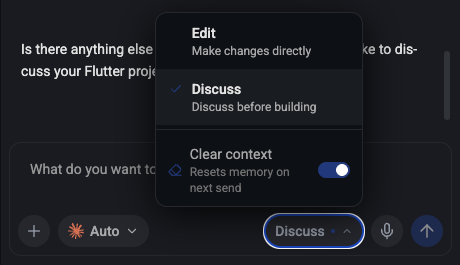
Open the Edit / Discuss dropdown in the chat input (bottom-right of the text field) and toggle Clear context on. A small blue dot appears on the button as a reminder that it is armed.
When you send your next message, Primio resets the agent’s conversation context first, then sends your prompt — so the agent starts fresh with exactly what you wrote. The toggle turns off automatically after that one send.
You’re switching to an unrelated task. You finished the login screen and now want to build in-app purchases. These share nothing. Keeping the login context around adds noise and can lead the agent to reference decisions that no longer apply. Clear, then start the new task with a focused prompt about what you want to build.
The agent is stuck in a wrong pattern. If you’ve corrected the agent two or three times on the same issue and it keeps drifting back to the wrong approach, the old attempts are polluting its reasoning. Clear and restart with a prompt that states the correct direction upfront. This is one of the highest-value uses of Clear Context.
After a big refactor or file restructure. If files were moved, classes renamed, or the architecture changed significantly, the agent’s context around the old structure is now stale. Clearing forces it to read the current state rather than editing files it thinks it knows.
You’re starting a focused debugging session. Debugging works best with tight context: the failing file, the error, your goal. A long history of unrelated features adds noise. Clear, then paste the error and point at the relevant file.
Clear Context does not delete files. It does not revert code. It does not affect snapshots or project history.
To undo code changes, use Rollback instead.
Rollback
Revert code changes when the AI goes in the wrong direction.
Advanced Prompting
More strategies for managing context, tokens, and complex builds.