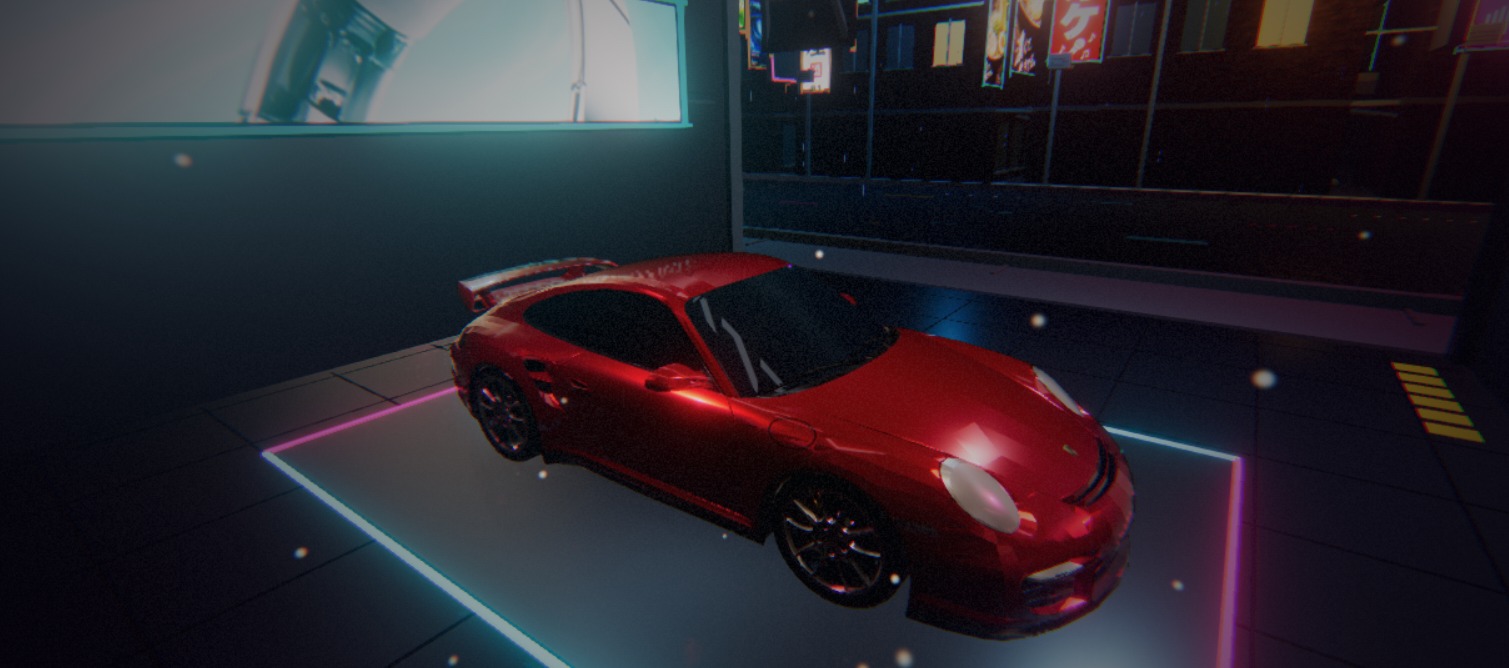
After Dark is a real-time 3D demo built entirely in Flutter, with no Unity or Unreal involved. It is one continuous flythrough of about four minutes: space, alien landscapes, neon Tokyo, a glowing forest, a city at night, and an underground club. We built it to see how far Flutter Scene can go today, and we shared it on r/FlutterDev, where several people asked how it was made. This post is the answer.
- Watch the recording on YouTube, captured on a Motorola Edge 70 Pro
- Run it in your browser
- Download the Android APK (Android 13 or newer)
What is in it
The journey moves through eight connected chapters: a planet arrival and a ship that turns into a character, a crater of bouncing chrome balls, a tunnel, Tokyo streets with a car garage and a nightclub, a forest with waterfalls and a wolf, a city with a train and a river dive, an underground dance hall, and closing credits. Shared 3D worlds and live portal views connect the chapters.
On the rendering side it uses skinned and animated characters, procedural geometry that is generated and deformed in code, physically based materials, environment lighting, spotlights with shadows, bloom, depth of field, crepuscular rays, screen-space reflections, animated water, and particles. The club’s neon equalizers are driven by 32 frequency bands precomputed from the soundtrack.
How it was made
1. The first version in Primio (2 days). The initial code was generated in Primio. By the end of this phase almost all scenes worked: the timeline, the camera paths through each chapter, the transitions, and the soundtrack were in place. What was missing was detail.
2. Export and detail pass with Codex and GPT-6 Astra (1 day). We exported the code and continued in Codex with GPT-6 Astra. This pass added most of the finish: the rear-view ship arrival, a darker crater, tunnel lighting and club equalizers that follow the music, and the river splash. It also covered the Android release work on a physical Motorola Edge 70 Pro, including a Vulkan crash caused by how long shadow resources were kept alive.
3. Camera and performance pass by Brandon DeRosier. Brandon, the creator of Flutter Scene, worked on the project between September 29 and October 9. Primio sponsors Flutter Scene, and this collaboration is part of that. His changes made the camera and character motion continuous, brought the city to life with traffic and neon, graded every chapter through a film look, gave the garage car a clear-coated paint finish, and moved the project to Flutter Scene 0.24.3. He also made the last major performance change, described below.
The result plays for about 4 minutes 17 seconds. The Android APK is about 137 MB, and the Google Play build requires Android 13 and Vulkan 1.1.
What we learned about performance
The demo runs on a mid-range phone without any special asset work. There is no texture compression and no reduction of bones on the animated characters. Most of the gains came from not doing work that does not show on screen.
- Stop updating what the camera cannot see. Scenes and objects outside the current view skip their animation updates. The exception is anything that still contributes shadows or light to what is visible, such as a nightclub with its doors open.
- Share and batch geometry. Repeated detail like plants and ferns shares one mesh and is drawn with instancing, static pieces like floor tiles are merged into a single mesh per material, and instance positions are updated in bulk instead of one at a time.
- Cache what does not change. The river’s fixed geometry terms and static shadows are computed once and reused.
- Load behind artwork, not during flight. Heavy loading happens while a full-screen artwork card is showing, and each scene is warmed up before the camera hands over to it, so there is no hitch mid-shot.
- Use a lighter shader on phones. Brandon turned off ambient occlusion on phones. That removes a whole render pass and lets every surface use a lighter shader. On a phone-sized screen the difference is hard to see.
- Release finished scenes. Once the credits fully cover the city, the city journey is released instead of being kept in memory until the end.
- Measure on a real phone. Android emulators render Flutter Scene through OpenGL ES, which is slower and behaves differently from the Vulkan path most current phones use. Our numbers and fixes came from the physical device.
Building your own 3D app
You can ask Primio for 3D in plain words, such as “a 3D racing game with a chase camera” or “a product viewer I can rotate”. Real-world objects like cars, animals, and furniture come from free, openly licensed 3D models that the app downloads on first use, and simpler shapes are built in code. The web preview may use a lighter look than the phone, so judge the final quality on a phone, for example with an APK build. When you want to take a project further outside Primio, as we did here, code export gives you the full Flutter project.
3D was one of the capabilities announced in Primio Just Got Skills. After Dark is what it looks like when you take it all the way.