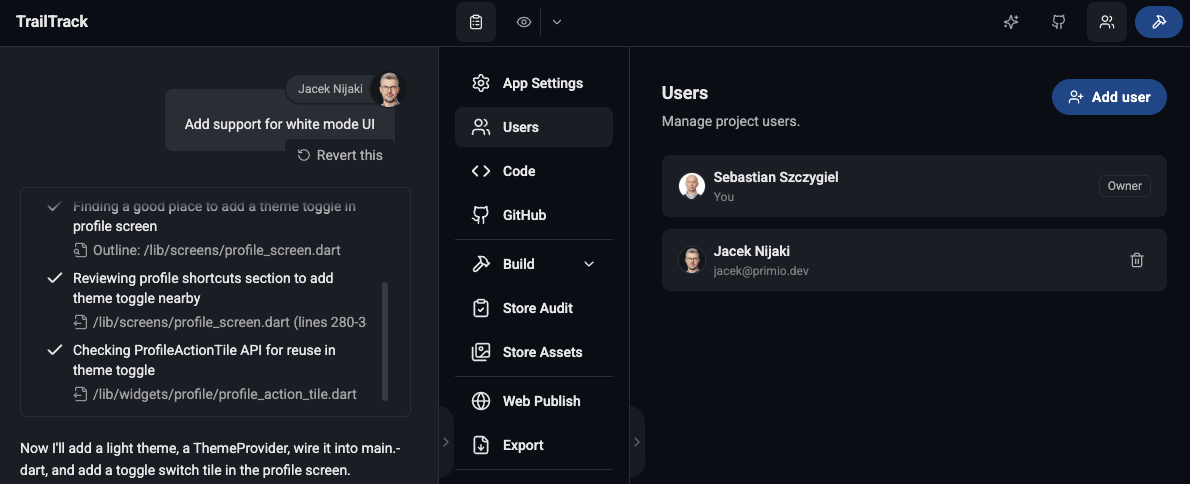
Until now, a Primio project belonged to one person. You could send a co-founder the preview link or hand a client an APK, but if they wanted to change something, it went through you — they described it, you prompted it.
That’s fixed. You can now add other people to a project, and they prompt and build in it exactly as you do.
One field, immediate access
Open your project, go to Workspace → Users, and click Add user. Enter an email address and click Add. That’s the whole flow.
Access is granted immediately. The project appears in their side menu as soon as you add them.
One requirement: the person must already have a Primio account. There’s no flow for adding someone who hasn’t signed up yet, so have them register first.
They build, not just watch
This isn’t view-only sharing. Everyone you add can prompt the agent, browse code, run previews and builds, and change app settings and the icon — the same day-to-day work you do.
What stays with you as the owner is control of the project itself: inviting and removing users, and deleting it. Ownership can’t be transferred.
To keep a shared project readable, chat messages show the sender’s avatar and name, so you can tell who prompted what. Shared projects are marked in the side menu too: a small icon sits next to the project name — a crown on the ones you own and have shared, a people icon on the ones shared with you.
The owner pays
A shared project runs on the owner’s tokens and the owner’s plan.
Every AI action draws from the owner’s balance, including prompts a user sends — they act on your behalf. Users see the project’s remaining balance in the chat input rather than their own, and only you can top it up.
Plan entitlements follow the owner as well. If you’re on a paid plan, everyone in your project gets the paid-only outputs — AAB, IPA, PWA export, code export, Store Assets, Store Audit — even if they’re on Free. It doesn’t work in reverse: a user’s own paid plan won’t lift a Free owner’s project.
One project, one owner, one bill, however many people are building in it.
Removing access
Open Workspace → Users, click the trash icon on a user’s row, and confirm. Access is revoked immediately.
Users can also leave on their own — hover the project in the side menu (long-press on mobile) and choose Leave project. Leaving doesn’t delete the project or affect anyone else.
What isn’t there yet
There are no per-user permission levels — everyone you add gets the same access. Ownership can’t be transferred, and there are no pending invites or invitation emails to manage.
Full details in the Project Sharing docs.