Primio builds with Flutter, so what you see in Live Preview is already an accurate, pixel-perfect rendering of your UI across platforms.
What a web preview can’t exercise is native device behavior: biometric prompts, real GPS, system permission dialogs, deep links, and OS-level gestures running against an actual operating system — plus the simple confidence of watching the exact binary you’re about to publish run on the device it’s built for.
Until now, checking that meant downloading the build, sideloading the APK onto a phone (or pushing an iOS build through TestFlight), and repeating the round-trip on every change. The Emulator removes that step entirely — your built binary runs on a virtual device, in the browser, the moment the build completes.
The real binary, real OS behavior
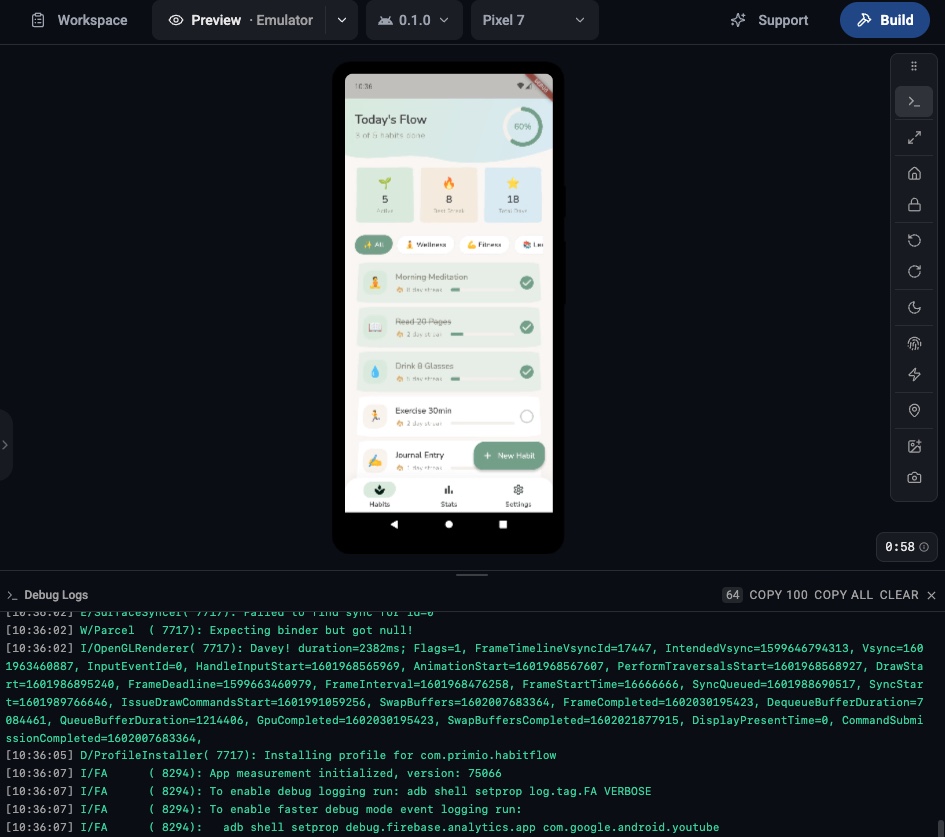
The Emulator runs your actual built binary — the Android APK or iOS build — on a virtual device, right inside the workspace. Not a web preview: the same binary you’d install on a physical phone.
From the toolbar you can simulate a successful biometric unlock, rotate the device, shake to surface debug menus, press system keys (Home, Lock), switch the appearance, and inject an image or video to stand in for the camera roll — then watch the live log stream as the app responds. This is the part of testing only the real binary on a real OS can prove, and now it runs in a browser tab.
No SDKs. No simulators to install. No certificates. Nothing on your machine.
See exactly why something broke
This is the Emulator’s biggest payoff. When a built app misbehaves, the screen rarely tells you why — a blank page on launch, a button that does nothing, a login that silently fails. On a physical phone you’d have no idea what happened without plugging into a laptop and a debugger. The Emulator’s live log panel streams the device’s real runtime output as the app runs, open by default, so the stack trace, the failed network call, or the plugin error shows up the moment it happens.
That makes it the fastest way to diagnose the failures a web preview can’t reach:
- A native crash or white screen on startup
- A permission or biometric prompt that’s denied or never appears
- A third-party SDK that fails to initialize — analytics, auth, push
- An API call or deep link that behaves differently from the built binary
And it closes the loop. One click copies the visible log (with an optional filter to hide system noise and keep only your app’s output) — paste it straight back into your prompt, and Primio reads the actual error and fixes it, instead of you guessing from a symptom.
Switch devices instantly
Pick from 30+ iOS and Android devices — phones and tablets — and switch between them mid-session. Want to check how your layout holds on a compact Android phone, then an iPad? Two clicks. Each device runs the same build, so you’re comparing real rendering, not guesses.
Two ways in, zero surprises
Switch the preview to Emulator and Primio automatically loads your most recently completed runnable build. Or open a specific build from your build history and hit Run in emulator.
From build to confidence
Live Preview is still the fastest way to iterate on your UI while you build — and with Flutter, it’s a faithful one. The Emulator is the next step: proving native behavior and watching the exact binary you’re about to publish behave the way it will for your users, before it ever leaves Primio.