Building an app is easy. Knowing what to build? That’s the hard part. You could spend weeks researching markets, analyzing competitors, and brainstorming ideas. Or you could browse real app store rankings, find what’s already working, and build your own version in minutes.
That’s exactly what Primio’s new Discover Apps feature lets you do.
The Problem: The Blank Canvas
Every app creator faces the same question: “What should I build?” You know you want to create something, but:
- The market feels saturated — everything seems done already
- You don’t know what people actually want
- You’re unsure if your idea has demand
- Starting from zero is intimidating
Meanwhile, the iOS App Store and Google Play are full of proven concepts. Apps with millions of downloads, thousands of 5-star reviews, and clear market fit. What if you could use that data as your starting point?
How Discover Apps Works
Primio’s Discover Apps feature connects real-time app store data directly to AI-powered app creation. Here’s how:
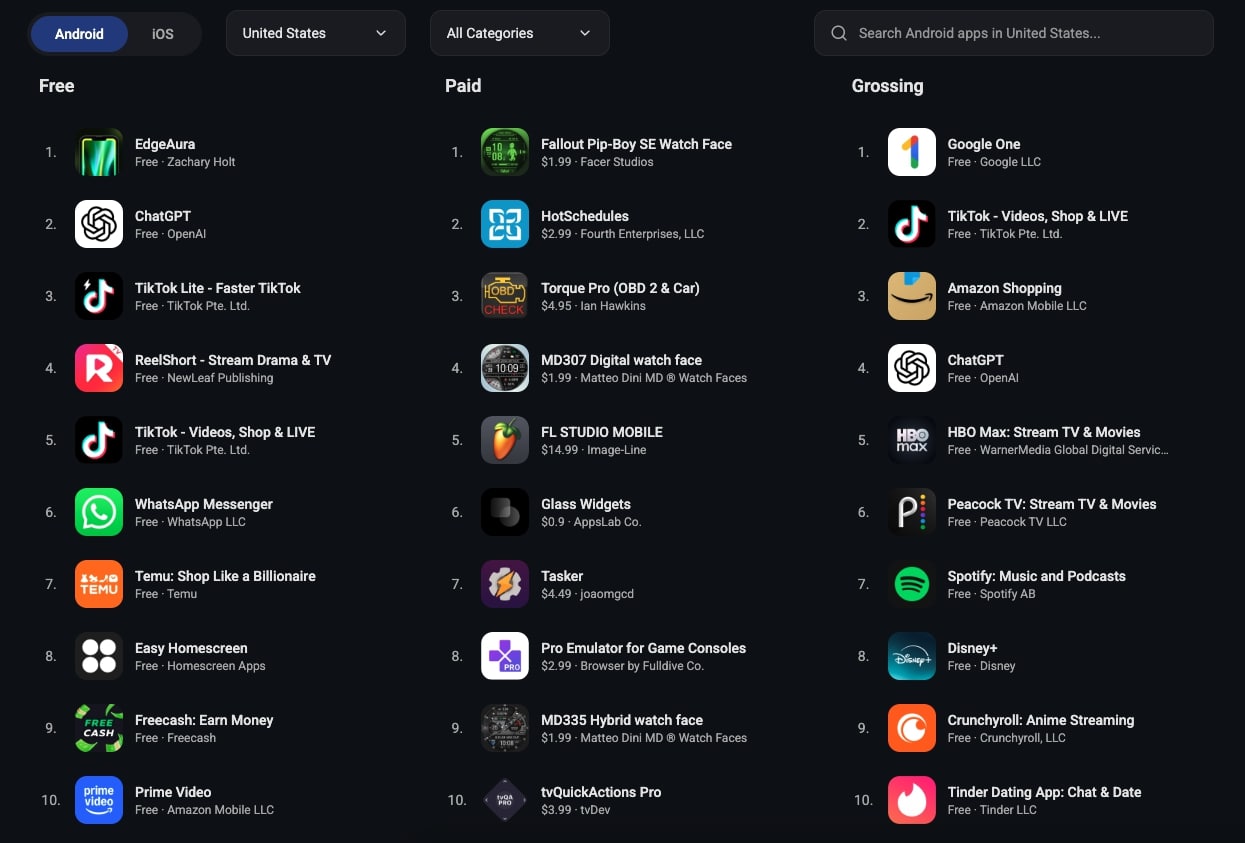
1. Browse Real App Store Rankings
Access live rankings from both iOS App Store and Google Play:
- Three ranking types — Free apps, Paid apps, Top-grossing apps
- 175 iOS countries — Every iOS App Store worldwide
- 155 Android countries — Global Google Play coverage
- All categories — Games, Productivity, Health, Finance, and more
- Smart filtering — Device type (iPhone/iPad), game subcategories
- Full data access — See all 200 ranked apps when logged in (top 30 for guests)
Want to know what’s trending in Productivity apps in Japan? Health apps in Germany? Gaming apps in Brazil? It’s all there, updated in real-time.
2. Search for Specific Apps
Not sure what you’re looking for? Use the search feature:
- Search across all apps in your selected country and store
- Filter by iOS or Android
- Find apps by name or developer
- Click any result to see full details
3. Analyze Any App in Detail
Click on any app to see everything:
- Screenshots — See the UI and design (3-5 images)
- Full description — Understand the concept and features
- Stats — Ratings, review counts, installs (Android), pricing
- Metadata — Version, size, content rating, IAP range, supported languages
This is your market research, delivered instantly.
4. Build Your Own Version with One Click
Found an app concept you like? Click “Build Something Like This” and Primio:
- Auto-generates a detailed AI prompt based on the app’s description
- Optionally includes app screenshots as visual reference for the UI
- Creates a new project and starts building immediately
Here’s what an auto-generated prompt looks like:
Take inspiration from the concept of "Calm" and create a unique app
with similar functionality.

Category: Health & Fitness

Reference description for inspiration:
[First 800 characters of the app's description]

Please create an original app inspired by this concept, with your own
unique implementation, modern design, and clean UI. Do not copy any
proprietary elements, branding, or trademarked content.
The AI understands the concept, analyzes the reference, and builds your unique version. No copying. No legal risk. Just inspiration turned into working code.
Real Example: Building a Meditation App
Let’s say you’re browsing the Health & Fitness category for iOS apps in the United States.
Step 1: You spot a meditation app ranked #12 in Free apps with a 4.8★ rating and 250K reviews.
Step 2: You click to view details. The description explains: “10-minute guided meditations for busy professionals. Track your streak, set daily reminders, choose from 50+ meditation themes.”
Step 3: You see five screenshots showing a clean, minimal interface with a timer, progress tracking, and theme selection.
Step 4: You click “Build Something Like This” and choose to include screenshots.
Step 5: Primio generates a prompt, creates your project, and starts building.
Result: In minutes, you have a working meditation app with:
- Your own unique branding and color scheme
- Original meditation content structure
- Clean UI inspired by (but not copying) the reference
- Timer, streak tracking, and theme selection features
- Ready to customize further with your own voice and style
From discovery to first version: under 10 minutes.
Legal & Ethical: Creating Original Apps
Let’s address the obvious question: Is this copying?
No. Here’s what actually happens:
What Primio takes as inspiration:
- The app category (e.g., “meditation app”)
- The core concept (e.g., “short guided sessions for busy people”)
- The general feature set (e.g., “timer + streak tracking + themes”)
- UI patterns from screenshots (e.g., “minimal design with large timer”)
What Primio creates:
- 100% original code written by AI
- Your own unique branding, colors, and design
- Original content (meditation scripts, copy, messaging)
- No trademarks, no copied assets, no proprietary elements
When you click “Build Something Like This,” you’re asking the AI to:
“Understand this concept and build me something functionally similar, but completely original in implementation, design, and branding.”
That’s inspiration, not duplication. It’s the same process entrepreneurs use every day: see what works, understand why it works, build your own version with your own twist.
Legal safeguards built in:
- Auto-generated prompts emphasize originality
- Confirmation dialog includes disclaimer
- Screenshots are optional reference only
- AI is instructed to create unique implementations
Think of it like this: Instagram was inspired by photo-sharing. TikTok was inspired by short-form video. Notion was inspired by workspace tools. Every successful app builds on proven concepts. Primio just makes that process faster.
Why This Works
Market validation is built in. If an app ranks in the top 200, people are downloading it. That’s demand you can tap into.
Concept clarity saves time. Reading a successful app’s description gives you a perfect brief for the AI. No vague prompts, no ambiguity.
Screenshots guide design. Visual references help the AI understand UI patterns, layout priorities, and interaction flows.
Speed creates advantage. Going from “I wonder if a meditation app would work” to “I have a working prototype” in 10 minutes means you can test ideas faster than anyone building from scratch.
Try It Now
Here’s how to use Discover Apps:
- Go to primio.dev/app-store-rankings
- Browse rankings — Filter by country, category, device type. Sign in to see all 200 apps per ranking (free users see top 30).
- Find an app you like — Look for high ratings, strong review counts, clear concepts.
- Click “Build Something Like This” — Choose whether to include screenshots for UI reference.
- Watch Primio build — Your project starts automatically with the generated prompt.
Start with proven concepts. Build your own version. Ship faster.
Best Practices for Using Discover Apps
Start with proven demand. Look for apps with:
- 4.5+ star ratings (quality signal)
- Thousands of reviews (engagement signal)
- Clear value propositions in descriptions (easy to understand)
Read the full description before building. The first 800 characters become your prompt reference. Make sure the concept aligns with what you want to create.
Use screenshots for UI inspiration. Including app screenshots helps the AI understand:
- Layout patterns (where elements should go)
- Visual hierarchy (what’s prominent vs secondary)
- Interaction design (how users navigate)
Add your unique twist. After Primio builds the base version, iterate:
- “Add a social feature where users can share streaks”
- “Include a premium tier with advanced meditations”
- “Make the color scheme warmer and more inviting”
Test across rankings. Free apps show broad appeal. Paid apps show willingness to pay. Top-grossing apps show monetization success. Each ranking tells a different story about what works.
Combine ideas. Browse multiple apps, note patterns, and ask Primio to merge concepts:
- “Build a meditation app with the timer from App A and the social features from App B”
- “Create a fitness tracker with the minimalist design of App X and the gamification of App Y”
Don’t just copy the #1 app. Sometimes apps ranked #20-50 have great concepts with less competition. Look for underserved niches.
What You Can Build
Discover Apps works across every category:
Productivity — Task managers, note apps, habit trackers, time blockers Health & Fitness — Workout trackers, meditation apps, diet planners, sleep monitors Finance — Budget apps, expense trackers, investment tools, receipt scanners Education — Flashcard apps, language learning, study timers, quiz builders Utilities — QR scanners, unit converters, calculators, file managers Lifestyle — Recipe apps, travel planners, outfit organizers, journaling tools Games — Puzzle games, word games, trivia, casual arcade games
Browse. Analyze. Build. Repeat.
From Inspiration to App in Minutes
The traditional path to building an app:
- Research the market (days)
- Analyze competitors (days)
- Write a spec document (hours)
- Hire a developer or learn to code (weeks to months)
- Build the first version (weeks)
- Launch and test (finally)
The Primio path:
- Browse rankings (5 minutes)
- Click “Build Something Like This” (1 click)
- Watch Primio build your app (10 minutes)
- Customize and iterate (as needed)
- Launch and test (same day)
Speed is the advantage. Iteration is the strategy. Discover Apps is your starting point.
Try it now on primio.dev and turn app store inspiration into reality.