
Design Library
Browse 12 curated visual styles to set your app’s overall look and feel.
The Gradient Builder is an interactive tool for designing gradients visually. You pick colors, adjust positions, and see the result in real time. When you’re happy with it, copy the generated Flutter code and send it to the AI.
Open the attachments menu (+ button) and select Gradient Builder. The Gradient Builder is available in existing projects only — not on the new project prompt.
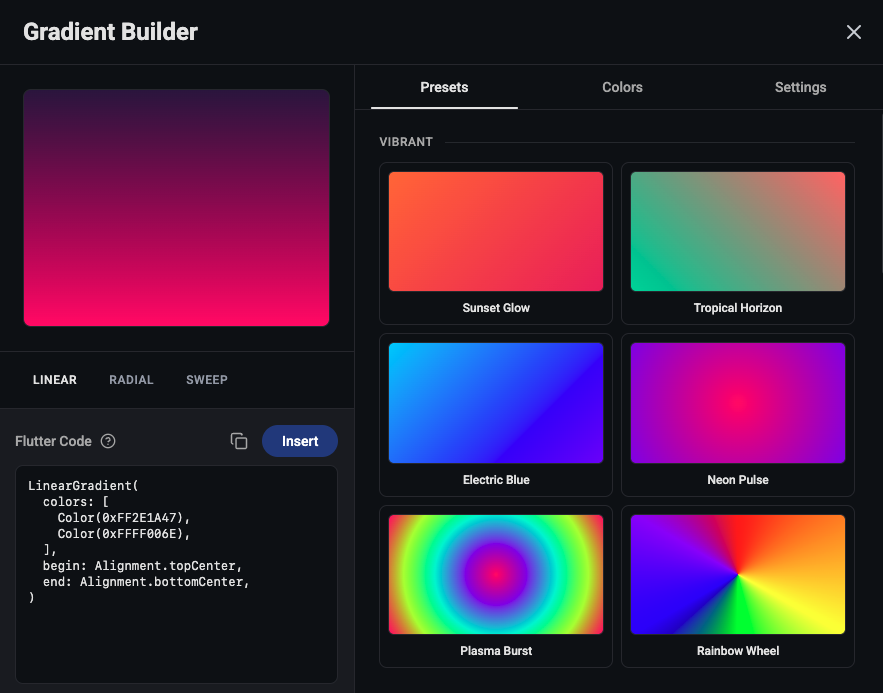
The builder has two main areas:
Left panel — live preview canvas showing your gradient, a filter selector, and the generated Flutter code.
Right panel — three tabs for adjusting the gradient:
Browse 20+ built-in gradient presets organized in categories (linear, radial, and sweep). Examples include Sunset Glow, Ocean Blue, Purple Midnight, and Forest Dawn. Click any preset to apply it instantly, then customize from there.
Starting from a preset is often faster than building from scratch.
Control the individual color stops that make up your gradient:
Configure the gradient type and direction:
The Flutter code in the left panel updates in real time as you make changes. When your gradient looks right:
You don’t need to understand the Dart code. Just paste it and describe the placement:
“Apply this gradient to the home screen background: [pasted code]”
“Use this as the header gradient on all screens: [pasted code]”
A help button next to the code explains what the generated Dart code does, if you’re curious.
Design Library
Browse 12 curated visual styles to set your app’s overall look and feel.
Attaching Context
Learn all the ways to attach context to your prompts — images, files, screenshots, and more.